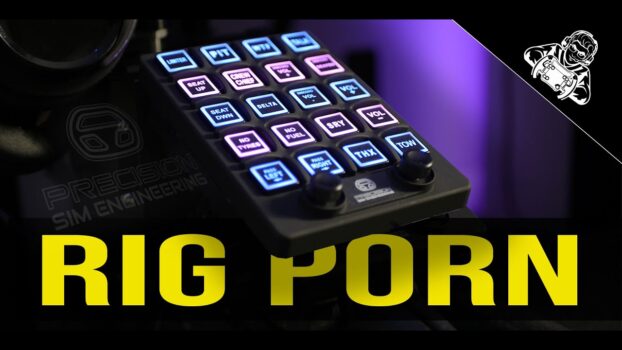
Quick verdict: The Precision Sim Engineering Pro Switch Panel is a beautifully made, slim and highly tactile premium button box. Its excellent controls, backlighting and straightforward operation make it more satisfying than a Stream Deck for core driving functions, but its fixed labels, lower versatility and high price mean it is a luxury rather than an essential upgrade.
The Precision Sim Engineering PSP sits between DIY button boxes and the premium consumer market. It targets buyers who would rather purchase a polished, ready-made device than build their own, while offering physical controls that compete with more flexible options such as the Stream Deck.
Product affiliate links & discounts
| Logo | Brands | Reseller | Discount Code | Link | Ships to | Locations |
|---|---|---|---|---|---|---|
 | Fanatec | Fanatec USA | https://laurencedusoswa.com/a/FANATEC-USA | America | Beverly Hills, California, USA | |
| Fanatec | Fanatec EU | https://laurencedusoswa.com/a/FANATEC-EU | EU | Landshut, Germany | |
| Fanatec | Fanatec Australia | https://laurencedusoswa.com/a/FANATEC-OZ | Australia | New South Wales, Australia | |
| Fanatec | Fanatec Japan | https://laurencedusoswa.com/a/FANATEC-JP | Japan | Tokyo, Japan | |
 | BDH, Conspit, Cube Controls, D-BOX, Heusinkveld, Logitech, MOZA, Pimax, Qubic System, Rexing, Simagic, Simucube, Trak Racer, VNM | Trak Racer USA | https://laurencedusoswa.com/a/TRAK-RACER-USA | America | Austin, Texas, USA | |
| BDH, Conspit, Cube Controls, D-BOX, Heusinkveld, Pimax, Qubic System, Rexing, Simagic, Simucube, Trak Racer, VNM | Trak Racer UK | https://laurencedusoswa.com/a/TRAK-RACER-UK | UK | Hertfordshire, England, UK | |
| BDH, Conspit, Cube Controls, D-BOX, Heusinkveld, MOZA, Pimax, Qubic System, Rexing, Simagic, Simucube, Trak Racer, VNM | Trak Racer EU | https://laurencedusoswa.com/a/TRAK-RACER-EU | EU | Venlo, The Netherlands | |
| BDH, BWT Alpine Formula One Team, Conspit, Cube Controls, D-BOX, Heusinkveld, Hot Wheels, Pimax, Qubic System, Rexing, Simagic, Simucube, Trak Racer, VNM | Trak Racer Australia | https://laurencedusoswa.com/a/TRAK-RACER-OZ | Australia | Victoria, Australia | |
 | Asetek | Asetek Global | 5% off with coupon code 'LD' | https://laurencedusoswa.com/a/ASETEK-GLOBAL | Global | Florida, USA. Aalborg, Denmark |
| Asetek | Asetek USA | 5% off with coupon code 'LD' | https://laurencedusoswa.com/a/ASETEK-USA | America | Florida, USA |
| Asetek | Asetek EU | 5% off with coupon code 'LD' | https://laurencedusoswa.com/a/ASETEK-EU | EU | Aalborg, Denmark |
 | Simagic | Simagic Direct | 3% off with coupon code 'LD' | https://laurencedusoswa.com/a/SIMAGIC | Global | Shenzhen, China, Asia |
 | Fanatec, GT Omega, HORI, Logitech G, MOZA Racing, Next Level Racing, Playseat, PXN, Thrustmaster, DIWANGUS | Amazon Global (will bring you to your local amazon store automatically) | https://laurencedusoswa.com/a/AMAZON | Global | ||
 | Apex Sim Racing, Cube Controls, D-BOX, Elgato, MOZA Racing, Pimax, Sabelt Sim Racing, Simagic, Simnet Racing, Simucube | Apex Sim Racing | 5% off with coupon code 'LD' | https://laurencedusoswa.com/a/APEX-SIM-RACING | Global | New Jersey, USA |
 | Advanced SimRacing, Ascher Racing, Base Performance Simulators, BavarianSimTec, BDH Race Sim Hardware, ButtKicker, Cube Controls, Daniel Newman Racing, D-BOX Technologies, Delta Sim-Tech, Gomez Sim Industries, Heusinkveld, IgnitiON Controls, Logitech, Max Papis Innovations, MME Motorsport, MOZA Racing, Novus Racing Simulators, P1Sim, Playseat, Precision Sim Engineering, Qubic System, Simucube, Sparco, Thrustmaster, Vero Motion, VNM Simulation, VPG Sim | Advanced Sim Racing | 5% off with code LDUSOSWAFIVE | https://laurencedusoswa.com/a/ASR | Global | Montreal, Canada |
 | Ascher Racing, ASUS, Base Performance Simulators, BDH Race Sim Hardware, ButtKicker, Cobra, Cube Controls, EPOS, Fanatec, Gigabyte, Go-Race, Gomez Sim Industries (GSI), Heusinkveld Engineering, ImSim, MME SimSport, MOZA, OBP, O-Rouge, Overclockers, Qubic System, Racelogic, Rexing, Sabelt Sim Racing, Samsung, Simucube, Simtag, Simtrecs, Sparco, Trak Racer, VPG Sim | Demon Tweeks | https://laurencedusoswa.com/a/DEMON-TWEEKS | Global | Wrexham, Wales, UK | |
 | bruzzi, ButtKicker, Conspit, Marina Racewear, MOZA Flight, MOZA Racing, Next Level Racing, Pro Simrig, Qubic System, Racing Sims, Sim Did, Simagic, Simetik, Simforge, Soelpec, Vero Motion | Abruzzi | https://laurencedusoswa.com/a/ABRUZZI | UK, EU | East-Sussex, England, UK | |
 | Streamlabs | Streamlabs | https://laurencedusoswa.com/a/STREAMLABS | Global | ||
| Restream | Restream | https://laurencedusoswa.com/a/RESTREAM | Global | |||
 | iRacing | iRacing | https://laurencedusoswa.com/a/IRACING | Global | Chelmsford, Massachusetts, USA | |
 | Coach Dave Delta | Coach Dave Academy | https://laurencedusoswa.com/a/CDA | Global | London, England, UK | |
 | Soelpec | Soelpec | https://laurencedusoswa.com/a/SOELPEC | Global | Istanbul, Turkey | |
 | Moza | Moza UK | https://laurencedusoswa.com/a/MOZA-UK | United Kingdom | UK | |
| Moza | Moza US | https://laurencedusoswa.com/a/MOZA-US | North & South America | USA | |
| Moza | Moza EU | https://laurencedusoswa.com/a/MOZA-EU | Global | Europe | |
| Moza | Moza Direct | https://laurencedusoswa.com/a/MOZA | Global | Shenzhen, China, Asia | |
 | Cobra, PRO SIMRIG, Qubic System, SIMAGIC, Sparco | RaceAnywhere | 5% off with coupon code 'LD' | https://laurencedusoswa.com/a/RACE-ANYWHERE | UK, EU | Northamptonshire, UK |
 | Grid Engineering, Sim-Lab, Sparco | Sim-Lab Direct | https://laurencedusoswa.com/a/SIM-LAB | Global | Tholen, The Netherlands, EU | |
 | Cammus | Cammus Direct | 5% off with code LDCAMMUS | https://laurencedusoswa.com/a/CAMMUS | Global | China, Asia |
 | Buttkicker | Buttkicker Direct | https://laurencedusoswa.com/a/BUTTKICKER | Global | Ohio, USA | |
 | Apex Sim Racing, Asetek SimSports, Gomez Sim Industries, Next Level Racing, SimSportGadget, Simtrecs, Simucube | SimRaceCity | 5% off with promocode: potato-nation | https://laurencedusoswa.com/a/SRC | USA | Fort Worth, Texas, USA |
 | Extreme Simracing, Simagic, D-BOX, DBOX | Extreme Simracing | https://laurencedusoswa.com/a/EXTREME-SIMRACING | America | Maringá, Paraná, Brazil | |
 | Ascher Racing, BavarianSimTec, SimRacingBay, Simucube | SimRacingBay | https://laurencedusoswa.com/a/SIMRACINGBAY | Global | Slovenia, EU | |
 | Simforge Engineering | Simforge Engineering | https://laurencedusoswa.com/a/SIMFORGE | Global | Chennai, India, ASIA | |
 | Website Hosting | HostGator | https://laurencedusoswa.com/a/HOST-GATOR | Global | USA | |
| RacGTing Racing Cockpits | RacGTing | https://laurencedusoswa.com/a/RACGTING | Global | Asia | ||
 | Getail Design | Getail Design | 5% off with coupon code 'LD' | https://laurencedusoswa.com/a/GETAIL | Global | Bergamo, Italy, EU |
 | Pimax | Pimax EU | https://laurencedusoswa.com/a/PIMAX-EU | EU | EU | |
| Pimax | Pimax | https://LaurenceDusoswa.com/a/PIMAX | Global | Shanghai , China | |
 | Asetek, Cube Controls, Fanatec, Sim Lab, Simagic | IRL Motorsports | https://laurencedusoswa.com/a/IRL-MOTORSPORTS | EU, UK | Dublin, Ireland | |
 | BDH | BDH Sim Hardware | https://laurencedusoswa.com/a/BDH | Global | Pocklington, York, UK | |
 | BDH, CAMMUS, Conspit, DOF Reality, Fanatec, Heusinkveld, MOZA Racing, PXN, Qubic System, Race Sim, Simnet Racing | RACESIM UK | 5% off with coupon code 'LD' | https://laurencedusoswa.com/a/RACESIMUK | UK, EU | London, UK |
 | Asetek SimSports, Conspit, Corbeau, Cube Controls, DOF Reality, Fanatec, Gomez Sim Industries (GSI), Heusinkveld, Leoxz, Moza, Sabelt, SIM HQ, Sim-Lab, Simagic, SRP, VRS | Simpatico Sim Shop | 5% off with coupon code 'POTATONATION' | https://laurencedusoswa.com/a/SIMPATICO | USA, Canada | Jacksonville FL, USA |
 | Conspit | iracesimulators | 10% off with code 'LD' | https://laurencedusoswa.com/a/IRACESIMULATORS | EU | Dublin, Ireland |
 | Bavarian Sim Tec | Bavarian Sim Tec | 5% off with coupon code LAURENCE-DUSOSWA | https://laurencedusoswa.com/a/BST | GLOBAL | Bavaria, Germany |
 | Advanced Sim Racing, Ascher Racing, D-Box Technologies, HandsOnPerformance, Heusinkveld, Moza, Novus, OMP, ProSimRig, Simagic, Sim Consultants, Simucube, Sparco, Vero Motion | Sim Consultants | 5% off Simagic with code 'LD' | https://laurencedusoswa.com/a/SIM-CONSULTANTS | EU, UK | Dublin, Ireland, EU |
 | Asetek SimSports, Conspit, Cooler Master, Cube Controls, Fanatec, Logitech, MOZA Racing, Next Level Racing, Nitro Concepts, noblechairs, Simucube, Thermaltake, Thrustmaster | Overclockers (UK & USA) | https://laurencedusoswa.com/A/OVERCLOCKERS | Global | UK, USA | |
 | Advanced Sim Racing, Ascher Racing, BDH, Conspit, Full Push, Moza, Next Level Racing, Novus, Thrustmaster, VPG Sim | Full Push | 5% off with code 'LD' | https://laurencedusoswa.com/A/FULLPUSH | Canada | Canada |
 | Simsonn | Simsonn | 8% off with code LAURENCEDUSOSWA | https://laurencedusoswa.com/A/SIMSONN | Global | Kington, Herefordshire, United Kingdom & China |
 | 3DRap, Another Way, Ascher Racing, Asetek SimSports, Bavarian SimTec, BDH Race Sim, Brook Raslution, ButtKicker, Circuit One, Conspit, Cooler Master, Cube Controls, D-BOX, Dayton Audio, Delta Sim-Tech, DOF Reality, Elgato, EPLAB, Esportsim, Fanatec, FatBlackCat, GSI, Heusinkveld, HORI, KGL Creation Lab, Leoxz, MME Motorsport, MOZA FlightSim, MOZA Racing, MPI, Next Level Racing, Nitro Concepts, Novus, OMP, O-Rouge, OPLite, P1Sim, Pimax, Playseat, Pro Flight Trainer, Prosimu, PXN, Qubic System, Res-Tech, Rexing, Sabelt, Sensit Haptics, SG Racing, Sim Factory, Sim-Lab, Sim Racing Studio, Simagic, Simforge, Simgrade, SimRep, SimRig, Simucube, Simufy, Simsonn, Simtrecs, SimXPro, Soelpec, Sparco, The Mech Cat, Thermaltake, Thrustmaster FlightSim, Thrustmaster SimRacing, Tillett, TORQ, TrackTime, Trak Racer, VERO Motion, VIRPIL Controls, Virtual Fly, VNM Simulation, VPG Sim, VRS, Wheel Stand Pro | Simufy | https://laurencedusoswa.com/A/SIMUFY | EU, Global | Granada, Spain, EU | |
 | AccuForce, Asetek, CAMMUS, Conspit, Elgato (Stream Deck), Fanatec, Gomez Sim Industries, Logitech, Moza, PXN, Simagic, Simucube, Thrustmaster, VNM, VRS, Virpil | Sim Sport Gadget | 5% off with coupon code 'LAURENCE' | https://laurencedusoswa.com/A/SIMSPORTGADGET | USA, Global | Newark, NJ, USA |
| Asetek Racing | Asetek Nordic | 5% off with coupon code 'LD' | https://laurencedusoswa.com/A/ASETEK-NORDIC | ||
 | UGREEN | UGREEN | https://laurencedusoswa.com/A/UGREEN | Global | EU | |
 | Honeycomb | Honeycomb | 10% discount with code LAURENCEDUSOSWA10 | https://laurencedusoswa.com/a/HONEYCOMB | Global | EU, USA |
Product link: https://www.precisionsimengineering.com/shop-online/pro-switch-panel
Stream Deck XL link (affiliate link): https://amzn.to/47QkSRq
If you’re curious about the case on my Stream Deck:
Simcore Stream Deck mounting case: https://simcore.com.au/sd-1xl-streamdeck-mounting-case/
Simcore Stream Deck side box: https://simcore.com.au/sdc-1/
Simcore side box mounts: https://simcore.com.au/sc-1-pivots/
Elgato mount for the Simcore case (affiliate link): https://amzn.to/45v4Riq
Introduction
Jump to: First impressions · Price · Hardware installation · Software setup · How it performs · Stream Deck comparison · Final thoughts
Review context: This review was originally published in April 2024. Prices, software support, profiles and availability described below reflect that period and may have changed. Precision Sim Engineering supplied the PSP free of charge but had no editorial control. Some links on this page are affiliate links and may support the site at no extra cost to you.
Precision Sim Engineering is an established premium manufacturer best known for its steering wheels and bespoke creations. The PSP combines 20 illuminated buttons with two seven-way hats in an unusually thin enclosure.
The conclusions in this review are entirely my own despite the review unit being supplied free of charge.
First impressions
When Precision Sim Engineering contacted me and asked me to review one of their products, I didn’t know which product they had in mind, but I wasn’t going to say no. I have used and handled their products in the past, but had never had one on my rig before. They’re renowned for their incredibly engineered steering wheels, so my anticipation and excitement was huge. But I have to admit, when I found out it was a button box, I was a little taken aback. I usually don’t do button box reviews because well… It’s just a button box. To compound my emotions, I already use and love my Stream Deck. In fact, the number one question I’ve gotten since I put up some images of this product is “Why wouldn’t you just buy a Stream Deck”. It took me some time to figure it out and I compare the two in a dedicated section below, but I’m happy I invested the time because now I get it and I really like this device.
The paint is a black matte finish which is almost rubbery to the touch, but also not grippy. There are raised ridges separating all the buttons. This makes the buttons feel a little bit recessed into the device without adding needless bulk. It’s worth noting that the little gaps between the ridges and the buttons do gather dirt over time and are very difficult to clean.
I am amazed how thin this button box is. It’s like nothing I’ve ever seen in this domain. The buttons are backlit and bright, even with stickers applied. Of course you can adjust the brightness and colours infinitely to match your rig or room lighting.
I understand people’s curiosity about this product. Many potential buyers will understandably be looking for confirmation that they do not need it. The funny thing is that those of you who are thinking about buying one, probably will.
Price
At the time of the April 2024 review, the PSP cost £249—roughly €290 or $315—with the mount adding another £30. That brought the reviewed configuration to approximately €338 or $366. A Stream Deck XL cost roughly €100 less and offered 15 additional buttons, while the PSP included two seven-way hats that were particularly useful with simpler steering wheels. Check current pricing and bundle contents before buying.
This really is one of those products for when you have a couple of hundred dollars to spare and already have pretty much everything else.
Hardware installation
Unboxing and installing high-end products should be an experience in its own right, and Precision Sim Engineering have absolutely blown my mind here. Imagine opening up your new product to see a dedicated slot in the luxurious packaging for every single nut and bolt. There are no plastic bags here.
There are quite a few bolts that need to be done up when installing the RAM mount but some of them were thumb screws which makes for a largely tool free experience. The RAM mount itself is excellent. It allows for interesting mounting angles including this really cool center console type look that I have gone for. It’s strong and it was an excellent choice to use a third party mount rather than trying to reinvent the wheel.
The USB cable is a single USB-B cable and that attaches at the back of the device. There is some added structure in the port to protect it from impact but it is somewhat bulky on the rear of this device.
Each button has a subtle ridge on it which makes sticker installation extremely easy. You end up with perfectly centred stickers and the finished look is incredible. Installing stickers took me a long time. Not so much physically, but more so mentally. Attaching a sticker feels like a big commitment. What if I want to change it? What if it’s in the wrong place? I’ll cover that in a later section.
Software setup
There are two main pieces of software at play here. SimHub and a piece of software called ChromaWorx. ChromaWorx serves no other purpose than to set the lighting profile for when simhub is not running, but your PC is powered on. It’s very limited in its functionality and it’s not very intuitive. You can change the colours of the buttons and that’s about it. You can import profiles into SimHub but I didn’t feel any benefit to doing so. ChromaWorx is excellent for basic users who just want to plug the button box in and use it, without worrying about complexity of configurations. Not everyone has the time or the interest to use SimHub. To be honest, users will only end up using either ChromaWorx OR SimHub, but not both.
For me though, SimHub is where the magic happens. This product wouldn’t be near as impressive without it. You can customise this to your heart’s content, but by default you get some really nice handy functionality. There are lighting animations for when you’re sitting in the pits, when your pit limiter is on, car right, car left, etc. You can easily group functionality with similarly coloured buttons. When SimHub is running, button presses become a lot more rewarding because there’s an inherent light fade on each button press.
If you want to exclude certain buttons from your animations, like I have done for the pit limiter and my discord deafen button, you can.
At the time of this review, the supplied profiles were heavily focused on iRacing and an Assetto Corsa Competizione profile was still being developed. Users could create profiles for other simulators, but that shifted more configuration work onto the buyer. Check the current software and profile support, as it may have expanded since April 2024.
How it performs
The buttons are nice and big. The stickers feel premium. The mounting is simple when you get the optional mount. The whole experience from unboxing to using this product is very high-end. The button presses are very tactile and the whole panel is like something you would find in a real modern race car.
Committing to a sticker layout was the least pleasant part of the experience. There are suggested sticker layouts but they didn’t really suit me. I also have a Stream Deck and there was no way that this device could replace everything my Stream Deck does. I’ll go into more detail on that in the next section. Removing stickers effectively ruins the sticker. You’ll always have a damaged edge on it which will never go back to normal. Luckily you do get 2 of each sticker sheet. The stickers are easy to read, beautifully centred and the aesthetic is really really nice.
These little controls are called seven-way hats, or funky switches. They offer 7 inputs. up, down, left and right, rotation to the right, rotation to the left and click down. These seven-way hats are great. I can’t see them replacing the need for seven-way hats on a steering wheel though, but when I was using wheels with less functionality, they really made life super easy for me. You can navigate menus consistently even if you switch steering wheels a lot. Having funky switches here can also potentially reduce the amount you need to spend on the steering wheels you buy.
Stream Deck comparison
This is the elephant in the room. They look similar and perform similar functions when it comes to sim racing. However, the Stream Deck is so much more versatile and a lot easier to customise. Not to mention the ability to have folders for subsets of controls, plugins for integrating with other apps, etc. So why would anyone bother with the Pro Switch Panel?
I also have a Stream Deck on my rig which I depend on heavily. So adding this PSP was a bit perplexing. As I spent time with it however, things started to make more sense. Firstly, a Stream Deck requires quite a bit of software integration and is a bit technical to set up. That’s not everyone’s cup of tea. It’s more of a DIY thing to do, really. It’s definitely flexible but you need to know what you’re doing. With the PSP, you can plug it in and start assigning buttons straight away. You definitely need to dive a little deeper to set up the lighting profiles to your liking, and you need to import the lighting profiles into SimHub.
The main difference that I wasn’t really anticipating is the tactile feel. While Stream Decks have decent buttons, they’re unrewarding to press and sometimes I have to double check whether I pressed it at all. The PSP has no such issues and when it comes for example to turning on your pit limiter, I have far more faith in the PSP’s rewarding click than I do in the Stream Deck’s lacklustre feedback.
The stickers on the PSP are far easier to read than the ice cube buttons of a Stream Deck but as explained in previous sections, committing to a sticker layout is kind of stressful. In so far as things like this can induce stress. Let’s call it “First World Stress”. On a Stream deck you can change the icon and text really easily without too much effort. So this is really a preference thing. It would be incredible to combine the tactile press of the PSP with the versatility of the Stream Deck. Maybe for the next iteration?
As time went on I realised that these devices could co-exist on my rig. If I had to get rid of one of them, the Stream Deck would stay on and the PSP would be rejected. However, I’m a nerd and if I was setting up a rig for others to use in a controlled environment, the PSP would be ideal.
Final thoughts
I honestly liked this product a lot more than I thought I would. This is a step above a basic button box. I’m a sucker for backlighting so they checked that box. While I’m partial to a touch screen phone, I prefer nice tactile buttons in real road and race cars. I want to be able to press them without too much thought. Having dedicated buttons within reach to raise and lower my seat for example, really added to my quality of life. Therein lies the confusion for many with this product. This is like the penthouse suite of button boxes. There are plenty of other devices which can achieve the same effect in your sim, but how you interact with it makes you feel really good. At least it does for me, and I have no issues admitting that even though it’s a very superficial thing. Nobody needs this button box. But like a fancy Rolex, you’ll feel a sense of achievement and enjoyment using it. Not to mention having something pretty that your friends don’t have.
Would I spend $300 on it? I’m not sure. It’s easy for me to say that I would, because I have one here that was sent to me for free. That being said, I spent similar on this aluminium Simcore case for my Stream Deck XL, and that excludes the price of the Stream Deck itself, so yes, I probably WOULD spend the money. I kind of feel like I’m not worthy of such a decadent panel and that’s a great sign of a top-end product.
The PSP earned a permanent place on my rig. It was not life-changing and it could not replace everything my Stream Deck did, but its physical controls, premium finish and ease of use made it far more valuable than I initially expected.




Add comment