
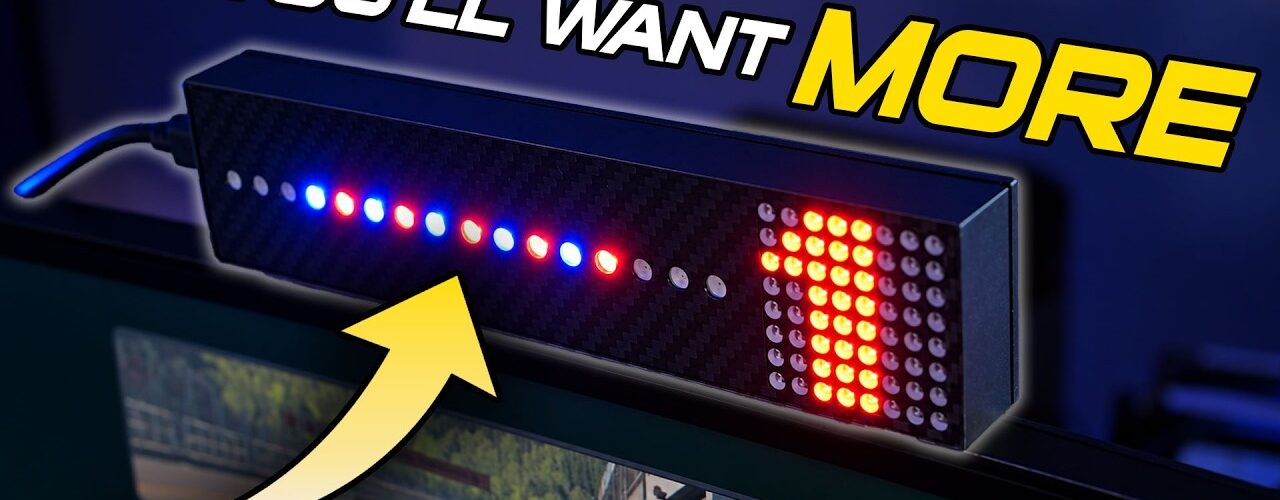
This is probably how your addiction to sim racing equipment starts. At around £45 / €50, the Overengineered Sim Racing Solutions gear and rev indicator looks harmless. It’s small, simple and absolutely not something you need.
And that’s exactly the problem. Once it’s sitting on your rig, flashing through the rev range and showing your current gear, it adds just enough extra polish that you start wondering what else you could add.
What is it?
Fundamentally, this is a very simple SimHub accessory. You get a gear indicator, RGB rev lights and the ability to use those LEDs for things like flags, pit limiter alerts and custom sequences. It’s Arduino-based hardware inside a 3D-printed enclosure, and it connects to your PC over USB-C.
You do need to provide your own USB-A to USB-C cable. That’s worth knowing before it arrives.
Yes, you could absolutely build something similar yourself. If you enjoy DIY electronics and 3D printing, go for it. But at roughly £45, I think the appeal here is obvious: somebody else has already built it, enclosed it nicely and made the whole thing essentially plug-and-play.
SimHub setup is incredibly easy
Once connected, the device appeared automatically for me in SimHub under the Arduino section. I didn’t need to flash firmware or start configuring an Arduino from scratch.
In fact, it basically worked out of the box. My first problem was entirely self-inflicted: I’d mounted it upside down. SimHub lets you change the matrix orientation, so a quick 90-degree adjustment fixed that without physically remounting anything.
From there, changing gear immediately updated the display and the LEDs behaved as expected. With the pit limiter active they flashed appropriately, then returned to functioning as rev lights when I left the pits.
Make sure your RPM settings are correct
I initially thought the rev lights were coming on too early in the Mazda. It turned out I had a per-car RPM override in SimHub set to around 6,000 RPM.
Once I disabled that override, everything behaved properly. As I approached the top of the rev range, the LEDs built naturally and the gear indicator itself flashed near the shift point.
That’s worth checking if yours appears to be behaving strangely. The hardware may be doing exactly what SimHub is telling it to do.
It looks good even on a high-end rig
This was probably my biggest surprise. My rig has considerably more expensive hardware on it, including steering wheels that already provide gear displays and rev LEDs. I didn’t expect this little device to add much.
But it does.
It adds colour and movement to the rig, it’s extremely easy to read in your peripheral vision, and visually it makes the setup look that little bit more complete. Despite having more sophisticated displays available to me, I can genuinely see myself leaving this installed long term.
More configurable than it first appears
The basic job is gear and rev indication, but because it works through SimHub you aren’t limited to that factory behaviour. The LEDs can be configured for flags and alerts, and you can create custom startup sequences or use community profiles for similar devices.
That flexibility is one of the reasons inexpensive Arduino-based accessories like this are so much fun. The physical product is simple; SimHub provides much of the intelligence behind it.
What would I change?
There really isn’t much to complain about at this price, but I would change the USB-C connection. The cable exits from the side of the enclosure and I’d much rather have it hidden at the rear. On a device whose job is partly to make your rig look better, cleaner cable routing would improve the presentation.
The enclosure is 3D printed rather than injection moulded, which is entirely reasonable for a small-volume product at this price. You should also follow the supplied advice about keeping it away from high-heat areas.
Internally it’s based around straightforward Arduino hardware, so I don’t have any particular reliability concerns from the design itself.
Do you need one?
Absolutely not.
That’s also why I like it so much.
This isn’t an upgrade that makes you faster. It doesn’t transform your force feedback or braking. It simply makes your rig nicer to use and nicer to look at, while providing useful information directly in front of you.
At around £45 when I reviewed it, that makes it a brilliant little upgrade, gift or stocking filler for somebody who already has the essentials covered. You can add it to an entry-level rig or put it beside equipment costing many times more and it still makes sense.
Overengineered Sim Racing Solutions gear indicator verdict
I don’t normally dedicate reviews to accessories this simple anymore, but smaller sim racing companies deserve some attention when they make something good.
Overengineered Sim Racing Solutions originally sent this to me without expecting a video. In fact, I initially told them I probably wouldn’t have time to review it. They simply wanted me to try it and give them some feedback.
After using it, I wanted to make the video anyway.
It’s inexpensive, uncomplicated, easy to configure and looks surprisingly good even on a very high-end setup. The side-mounted USB cable is the one obvious thing I’d change, but otherwise it does exactly what I want this kind of accessory to do.
For roughly £45 / €50, I highly recommend it. You can buy the gear indicator and shift lights directly from Overengineered Sim Racing Solutions. Just don’t blame me when this turns into another SimHub display, a button box, rumble motors and whatever other accessory you suddenly decide your rig needs next.
Disclosure: Overengineered Sim Racing Solutions supplied this product to me without requiring a review or video. The opinions above are my own.









Add comment