
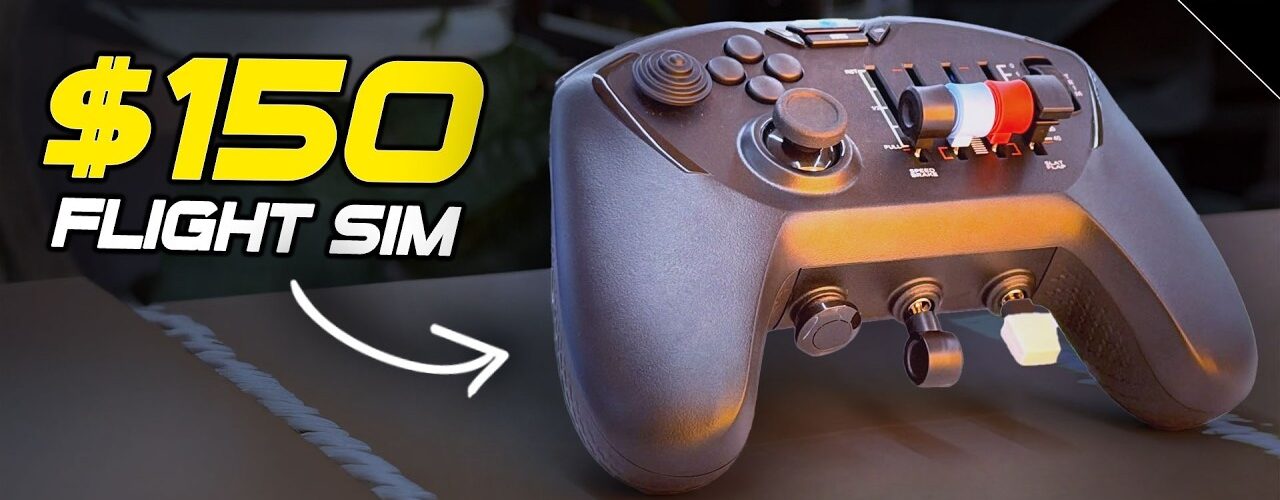
I love simulation in general, but there has always been one fairly obvious problem with getting properly into flight simulation: the hardware. A yoke, throttle, rudder pedals and all the other controls take up space, use more USB ports and quickly turn a clean sim racing rig into something you have to climb around.
The Honeycomb Echo Aviation Controller has largely removed that barrier for me. I first saw it months before this review and immediately loved the idea. After living with it for many months, I was still picking it up at least once a week just to go flying. That’s probably the most important thing I can say about it: it made me actually use a flight simulator.
| Logo | Brands | Reseller | Discount Code | Link | Ships to | Locations |
|---|---|---|---|---|---|---|
 | Fanatec | Fanatec USA | https://laurencedusoswa.com/a/FANATEC-USA | America | Beverly Hills, California, USA | |
| Fanatec | Fanatec EU | https://laurencedusoswa.com/a/FANATEC-EU | EU | Landshut, Germany | |
| Fanatec | Fanatec Australia | https://laurencedusoswa.com/a/FANATEC-OZ | Australia | New South Wales, Australia | |
| Fanatec | Fanatec Japan | https://laurencedusoswa.com/a/FANATEC-JP | Japan | Tokyo, Japan | |
 | BDH, Conspit, Cube Controls, D-BOX, Heusinkveld, Logitech, MOZA, Pimax, Qubic System, Rexing, Simagic, Simucube, Trak Racer, VNM | Trak Racer USA | https://laurencedusoswa.com/a/TRAK-RACER-USA | America | Austin, Texas, USA | |
| BDH, Conspit, Cube Controls, D-BOX, Heusinkveld, Pimax, Qubic System, Rexing, Simagic, Simucube, Trak Racer, VNM | Trak Racer UK | https://laurencedusoswa.com/a/TRAK-RACER-UK | UK | Hertfordshire, England, UK | |
| BDH, Conspit, Cube Controls, D-BOX, Heusinkveld, MOZA, Pimax, Qubic System, Rexing, Simagic, Simucube, Trak Racer, VNM | Trak Racer EU | https://laurencedusoswa.com/a/TRAK-RACER-EU | EU | Venlo, The Netherlands | |
| BDH, BWT Alpine Formula One Team, Conspit, Cube Controls, D-BOX, Heusinkveld, Hot Wheels, Pimax, Qubic System, Rexing, Simagic, Simucube, Trak Racer, VNM | Trak Racer Australia | https://laurencedusoswa.com/a/TRAK-RACER-OZ | Australia | Victoria, Australia | |
 | Asetek | Asetek Global | 5% off with coupon code 'LD' | https://laurencedusoswa.com/a/ASETEK-GLOBAL | Global | Florida, USA. Aalborg, Denmark |
| Asetek | Asetek USA | 5% off with coupon code 'LD' | https://laurencedusoswa.com/a/ASETEK-USA | America | Florida, USA |
| Asetek | Asetek EU | 5% off with coupon code 'LD' | https://laurencedusoswa.com/a/ASETEK-EU | EU | Aalborg, Denmark |
 | Simagic | Simagic Direct | 3% off with coupon code 'LD' | https://laurencedusoswa.com/a/SIMAGIC | Global | Shenzhen, China, Asia |
 | Fanatec, GT Omega, HORI, Logitech G, MOZA Racing, Next Level Racing, Playseat, PXN, Thrustmaster, DIWANGUS | Amazon Global (will bring you to your local amazon store automatically) | https://laurencedusoswa.com/a/AMAZON | Global | ||
 | Apex Sim Racing, Cube Controls, D-BOX, Elgato, MOZA Racing, Pimax, Sabelt Sim Racing, Simagic, Simnet Racing, Simucube | Apex Sim Racing | 5% off with coupon code 'LD' | https://laurencedusoswa.com/a/APEX-SIM-RACING | Global | New Jersey, USA |
 | Advanced SimRacing, Ascher Racing, Base Performance Simulators, BavarianSimTec, BDH Race Sim Hardware, ButtKicker, Cube Controls, Daniel Newman Racing, D-BOX Technologies, Delta Sim-Tech, Gomez Sim Industries, Heusinkveld, IgnitiON Controls, Logitech, Max Papis Innovations, MME Motorsport, MOZA Racing, Novus Racing Simulators, P1Sim, Playseat, Precision Sim Engineering, Qubic System, Simucube, Sparco, Thrustmaster, Vero Motion, VNM Simulation, VPG Sim | Advanced Sim Racing | 5% off with code LDUSOSWAFIVE | https://laurencedusoswa.com/a/ASR | Global | Montreal, Canada |
 | Ascher Racing, ASUS, Base Performance Simulators, BDH Race Sim Hardware, ButtKicker, Cobra, Cube Controls, EPOS, Fanatec, Gigabyte, Go-Race, Gomez Sim Industries (GSI), Heusinkveld Engineering, ImSim, MME SimSport, MOZA, OBP, O-Rouge, Overclockers, Qubic System, Racelogic, Rexing, Sabelt Sim Racing, Samsung, Simucube, Simtag, Simtrecs, Sparco, Trak Racer, VPG Sim | Demon Tweeks | https://laurencedusoswa.com/a/DEMON-TWEEKS | Global | Wrexham, Wales, UK | |
 | bruzzi, ButtKicker, Conspit, Marina Racewear, MOZA Flight, MOZA Racing, Next Level Racing, Pro Simrig, Qubic System, Racing Sims, Sim Did, Simagic, Simetik, Simforge, Soelpec, Vero Motion | Abruzzi | https://laurencedusoswa.com/a/ABRUZZI | UK, EU | East-Sussex, England, UK | |
 | Streamlabs | Streamlabs | https://laurencedusoswa.com/a/STREAMLABS | Global | ||
| Restream | Restream | https://laurencedusoswa.com/a/RESTREAM | Global | |||
 | iRacing | iRacing | https://laurencedusoswa.com/a/IRACING | Global | Chelmsford, Massachusetts, USA | |
 | Coach Dave Delta | Coach Dave Academy | https://laurencedusoswa.com/a/CDA | Global | London, England, UK | |
 | Soelpec | Soelpec | https://laurencedusoswa.com/a/SOELPEC | Global | Istanbul, Turkey | |
 | Moza | Moza UK | https://laurencedusoswa.com/a/MOZA-UK | United Kingdom | UK | |
| Moza | Moza US | https://laurencedusoswa.com/a/MOZA-US | North & South America | USA | |
| Moza | Moza EU | https://laurencedusoswa.com/a/MOZA-EU | Global | Europe | |
| Moza | Moza Direct | https://laurencedusoswa.com/a/MOZA | Global | Shenzhen, China, Asia | |
 | Cobra, PRO SIMRIG, Qubic System, SIMAGIC, Sparco | RaceAnywhere | 5% off with coupon code 'LD' | https://laurencedusoswa.com/a/RACE-ANYWHERE | UK, EU | Northamptonshire, UK |
 | Grid Engineering, Sim-Lab, Sparco | Sim-Lab Direct | https://laurencedusoswa.com/a/SIM-LAB | Global | Tholen, The Netherlands, EU | |
 | Cammus | Cammus Direct | 5% off with code LDCAMMUS | https://laurencedusoswa.com/a/CAMMUS | Global | China, Asia |
 | Buttkicker | Buttkicker Direct | https://laurencedusoswa.com/a/BUTTKICKER | Global | Ohio, USA | |
 | Apex Sim Racing, Asetek SimSports, Gomez Sim Industries, Next Level Racing, SimSportGadget, Simtrecs, Simucube | SimRaceCity | 5% off with promocode: potato-nation | https://laurencedusoswa.com/a/SRC | USA | Fort Worth, Texas, USA |
 | Extreme Simracing, Simagic, D-BOX, DBOX | Extreme Simracing | https://laurencedusoswa.com/a/EXTREME-SIMRACING | America | Maringá, Paraná, Brazil | |
 | Ascher Racing, BavarianSimTec, SimRacingBay, Simucube | SimRacingBay | https://laurencedusoswa.com/a/SIMRACINGBAY | Global | Slovenia, EU | |
 | Simforge Engineering | Simforge Engineering | https://laurencedusoswa.com/a/SIMFORGE | Global | Chennai, India, ASIA | |
 | Website Hosting | HostGator | https://laurencedusoswa.com/a/HOST-GATOR | Global | USA | |
| RacGTing Racing Cockpits | RacGTing | https://laurencedusoswa.com/a/RACGTING | Global | Asia | ||
 | Getail Design | Getail Design | 5% off with coupon code 'LD' | https://laurencedusoswa.com/a/GETAIL | Global | Bergamo, Italy, EU |
 | Pimax | Pimax EU | https://laurencedusoswa.com/a/PIMAX-EU | EU | EU | |
| Pimax | Pimax | https://LaurenceDusoswa.com/a/PIMAX | Global | Shanghai , China | |
 | Asetek, Cube Controls, Fanatec, Sim Lab, Simagic | IRL Motorsports | https://laurencedusoswa.com/a/IRL-MOTORSPORTS | EU, UK | Dublin, Ireland | |
 | BDH | BDH Sim Hardware | https://laurencedusoswa.com/a/BDH | Global | Pocklington, York, UK | |
 | BDH, CAMMUS, Conspit, DOF Reality, Fanatec, Heusinkveld, MOZA Racing, PXN, Qubic System, Race Sim, Simnet Racing | RACESIM UK | 5% off with coupon code 'LD' | https://laurencedusoswa.com/a/RACESIMUK | UK, EU | London, UK |
 | Asetek SimSports, Conspit, Corbeau, Cube Controls, DOF Reality, Fanatec, Gomez Sim Industries (GSI), Heusinkveld, Leoxz, Moza, Sabelt, SIM HQ, Sim-Lab, Simagic, SRP, VRS | Simpatico Sim Shop | 5% off with coupon code 'POTATONATION' | https://laurencedusoswa.com/a/SIMPATICO | USA, Canada | Jacksonville FL, USA |
 | Conspit | iracesimulators | 10% off with code 'LD' | https://laurencedusoswa.com/a/IRACESIMULATORS | EU | Dublin, Ireland |
 | Bavarian Sim Tec | Bavarian Sim Tec | 5% off with coupon code LAURENCE-DUSOSWA | https://laurencedusoswa.com/a/BST | GLOBAL | Bavaria, Germany |
 | Advanced Sim Racing, Ascher Racing, D-Box Technologies, HandsOnPerformance, Heusinkveld, Moza, Novus, OMP, ProSimRig, Simagic, Sim Consultants, Simucube, Sparco, Vero Motion | Sim Consultants | 5% off Simagic with code 'LD' | https://laurencedusoswa.com/a/SIM-CONSULTANTS | EU, UK | Dublin, Ireland, EU |
 | Asetek SimSports, Conspit, Cooler Master, Cube Controls, Fanatec, Logitech, MOZA Racing, Next Level Racing, Nitro Concepts, noblechairs, Simucube, Thermaltake, Thrustmaster | Overclockers (UK & USA) | https://laurencedusoswa.com/A/OVERCLOCKERS | Global | UK, USA | |
 | Advanced Sim Racing, Ascher Racing, BDH, Conspit, Full Push, Moza, Next Level Racing, Novus, Thrustmaster, VPG Sim | Full Push | 5% off with code 'LD' | https://laurencedusoswa.com/A/FULLPUSH | Canada | Canada |
 | Simsonn | Simsonn | 8% off with code LAURENCEDUSOSWA | https://laurencedusoswa.com/A/SIMSONN | Global | Kington, Herefordshire, United Kingdom & China |
 | 3DRap, Another Way, Ascher Racing, Asetek SimSports, Bavarian SimTec, BDH Race Sim, Brook Raslution, ButtKicker, Circuit One, Conspit, Cooler Master, Cube Controls, D-BOX, Dayton Audio, Delta Sim-Tech, DOF Reality, Elgato, EPLAB, Esportsim, Fanatec, FatBlackCat, GSI, Heusinkveld, HORI, KGL Creation Lab, Leoxz, MME Motorsport, MOZA FlightSim, MOZA Racing, MPI, Next Level Racing, Nitro Concepts, Novus, OMP, O-Rouge, OPLite, P1Sim, Pimax, Playseat, Pro Flight Trainer, Prosimu, PXN, Qubic System, Res-Tech, Rexing, Sabelt, Sensit Haptics, SG Racing, Sim Factory, Sim-Lab, Sim Racing Studio, Simagic, Simforge, Simgrade, SimRep, SimRig, Simucube, Simufy, Simsonn, Simtrecs, SimXPro, Soelpec, Sparco, The Mech Cat, Thermaltake, Thrustmaster FlightSim, Thrustmaster SimRacing, Tillett, TORQ, TrackTime, Trak Racer, VERO Motion, VIRPIL Controls, Virtual Fly, VNM Simulation, VPG Sim, VRS, Wheel Stand Pro | Simufy | https://laurencedusoswa.com/A/SIMUFY | EU, Global | Granada, Spain, EU | |
 | AccuForce, Asetek, CAMMUS, Conspit, Elgato (Stream Deck), Fanatec, Gomez Sim Industries, Logitech, Moza, PXN, Simagic, Simucube, Thrustmaster, VNM, VRS, Virpil | Sim Sport Gadget | 5% off with coupon code 'LAURENCE' | https://laurencedusoswa.com/A/SIMSPORTGADGET | USA, Global | Newark, NJ, USA |
| Asetek Racing | Asetek Nordic | 5% off with coupon code 'LD' | https://laurencedusoswa.com/A/ASETEK-NORDIC | ||
 | UGREEN | UGREEN | https://laurencedusoswa.com/A/UGREEN | Global | EU | |
 | Honeycomb | Honeycomb | 10% discount with code LAURENCEDUSOSWA10 | https://laurencedusoswa.com/a/HONEYCOMB | Global | EU, USA |
A flight simulator setup in one controller
The attraction is easy to understand when you look at how much Honeycomb has squeezed into a controller you can hold in your hands. There is an analogue stick for flying, three configurable levers that can handle throttle, propeller or mixture controls, a trim wheel, flap and landing-gear controls, a parking brake, additional buttons and a four-way hat.
On the back are the rudder controls. These are one of my favourite parts of the Echo. Push one side and the opposite side physically moves with it. It’s a wonderfully simple mechanical detail, but it gives the controls that little extra sense of simulation rather than feeling like two unrelated gamepad buttons.
The throttle levers also have an additional input at the bottom of their travel which can be used for something like reverse thrust. Because the controls are configurable, you aren’t locked into the exact layout I’ve used. A twin-engine setup, for example, can use those levers differently.
The interchangeable throttle caps are a brilliant touch
One of the things I particularly like is that the caps on the control levers can be swapped. Honeycomb includes alternatives in the carry case, allowing you to change the physical shape of the controls depending on the kind of aircraft or configuration you want to simulate.
I’m not going to pretend to be the flight-sim expert who can tell you that every cap is in exactly the right place for a Boeing or Cessna. That’s almost beside the point for me. What I love is that Honeycomb recognised that simulation enthusiasts want controls to feel like controls rather than simply having a row of generic analogue inputs.
It solved the biggest problem with flight sim for me
I see sim racers with extremely elaborate rigs that somehow accommodate both racing and flying hardware. It can absolutely be done, but suddenly there are controls protruding everywhere, extra USB devices and another collection of hardware to move whenever you change simulation.
The Echo is the opposite. I can take the steering wheel off my racing rig, sit back with a clear view of the monitor and fly. I can use it from a couch. When I’m finished, it goes in a drawer.
That convenience matters more than I expected. I had wanted to get further into flight simulation for a long time, but this controller was what finally encouraged me to put in the hours, earn licences in Microsoft Flight Simulator and actually learn more about flying rather than just occasionally loading the game.
It’s also genuinely portable
Honeycomb supplies a proper carry case, and the complete controller is small enough to make sense as travel hardware. If you’ve got a laptop capable of running a flight simulator, taking an entire HOTAS, yoke and pedal setup with you isn’t realistic. Taking this is.
It uses a USB connection rather than Bluetooth. For me that’s not a problem – reliability matters more here – and once connected you have most of the controls required to sit down and start flying without assembling a cockpit around yourself.
What I’d change on the Echo
Using the controller over a longer period also highlighted a few things I’d change in a future version.
The biggest is the right-hand side. The four-way hat is normally used for changing view, but I rarely enjoyed using it for that. I’d much rather have a second analogue stick on the right so I could fly with the left stick and smoothly look around with the right. Most of the time I’m flying, that would be far more useful to me than the existing hat.
I’d also like the rear brake buttons to be analogue. In their default brake assignment they’re simply on/off inputs, which makes braking much more aggressive than an analogue trigger would. Something similar to the triggers on a conventional Xbox or PlayStation controller would give much finer control.
There is also some unused space where I’d happily take additional adjustment wheels, and I’d be interested in seeing whether a future version could add more dynamic movement to the primary flight control rather than it simply returning to centre.
Importantly, I wouldn’t change much about the rudder system. That part works extremely well.
My Microsoft Flight Simulator settings
The main analogue stick felt very sensitive to me initially. In Microsoft Flight Simulator I reduced its sensitivity to 0.5 and did the same with the rudder controls. I left the throttle-style sliders alone.
That simple change made subtle inputs much easier and was essentially all the tuning I needed.
I did occasionally encounter odd control assignments being changed or lost, although I wouldn’t automatically blame the Echo for that. My PC constantly has steering wheels, pedals, shifters and other input devices being connected and removed, and Microsoft Flight Simulator itself can become confused by changing control configurations.
Who is the Honeycomb Echo actually for?
For me there are two particularly obvious groups: sim racers who want to try flight simulation and people who want to fly while travelling.
If you already have a dedicated flight-sim cockpit with a yoke, rudder pedals and throttle quadrant, the Echo obviously isn’t trying to replace the ultimate version of that experience. But if that amount of hardware is the reason you haven’t bothered getting into flight simulation, this is a fantastic compromise that rarely feels like much of a compromise at all.
I’ve mainly used it with smaller single-engine aircraft because I enjoy how responsive they are, although learning approaches and landings in larger aircraft has been one of the most enjoyable parts of getting further into flight simulation. I even used it for the Red Bull-style air racing. I hadn’t meaningfully tested helicopters at the time of this review, so I can’t judge it as a helicopter controller.
The danger: it’s a gateway drug
The funny thing is that buying an Echo might eventually make you want the exact dedicated flight-sim hardware you were trying to avoid. Once you’ve spent enough time flying, it’s very easy to start wondering what a proper yoke, throttle quadrant and rudder pedals would add.
But I don’t think that makes the Echo redundant. Even if I eventually built a dedicated flight setup, I’d still want this for the couch, travelling or simply those times when I want to fly without setting anything up.
Honeycomb Echo Aviation Controller verdict
At roughly $150 / €150 when I reviewed it, I thought the Honeycomb Echo Aviation Controller was an absolutely fantastic purchase. It costs far less than assembling all the dedicated hardware it effectively substitutes for, takes up almost no permanent space and can be packed away in seconds.
It’s not perfect. I want a second analogue stick for the camera, analogue brake controls and perhaps a few more rotary adjustments. Those are meaningful improvements I’d love to see in a second generation rather than reasons I wouldn’t buy this one.
The important thing is what happened after I got it. Instead of thinking about getting into flight simulation, I actually got into flight simulation. For a sim racer who already has a racing rig and doesn’t want to build a second cockpit around it, that’s exactly why the Echo works so well.
Disclosure: Honeycomb supplied the Echo Aviation Controller for review. The conclusions above are my own. Where affiliate links are provided on my site or alongside the original video, using them may earn me a commission without increasing the price you pay.





Add comment